Showing posts with label FamilySearch. Show all posts

Saturday, April 30, 2022

Using the Family History Library Record Lookup Service

Have you heard about the Family History Library Record Lookup Service? It's a very convenient way to obtain digital copies of Chicago vital records.

If you're familiar with FamilySearch's Cook County indexes, skip to the bottom of this post to find out how to use the lookup service to get copies of the records. If you're not, skim the quick tutorial on finding index entries, and then continue on to learn how to get the corresponding images.

Start by searching a FamilySearch index like the ones linked below.

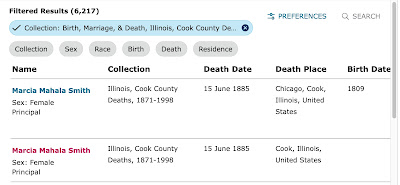
Using a death certificate search for Marcia Mahala Smith as an example, search the Cook County death index. The two matches are shown in the image below.

Click on Marcia's name to open a new window on the right of the screen.

Click on "view record" moves to a new screen.

"Image unavailable" means the certificate can't be viewed on FamilySearch from a home computer because of copyright restrictions, but don't stop there.The arrow circled in red is the key to obtaining a digital copy of the certificate. Click on the it to find the digital folder number and the image number--the key pieces of information needed to retrieve the certificate image.

If you can visit a local family history center, an affiliate library, or the Family History Library in Salt Lake City, you will have an option to view and download the certificate. But, if you can't, the Family History Library Lookup Service is a great alternative. Simply fill out the form using information from the FamilySearch index page, submit, and watch your email inbox for a digital copy of the record.

Everything you need to know about using the service is available on the page linked above, but, in a nutshell, you can request up to ten records per week and experience tells me the images usually arrive in a few days, but sometimes it takes longer. All of the early Cook County vital records that appear in the indexes should be available, but it's possible some of the later ones might not be. (If a record can't be shared, the volunteers will let you know.)

Saturday, March 13, 2021

Preparing to Retrieve Locked Images from FamilySearch

Once you reach this page, save the URL so it will be easy to get back to the image when you visit the family history center.

Sometimes people email me to ask how to find the Chicago vital records that are indexed on FamilySearch. Here's a quick answer to that question.

The first step is to see if the record is available for free on FamilySearch. Here's how to do that:

1) Find the index entry and click on the arrow to open the "Document Information."

2. Note the digital folder number and the image number.

3. Go to the FamilySearch Catalog and select Film/Fiche Number under "Search For."

4. Search for the digital folder number.

5. Click on the title link for the record collection that contains the digital folder.

6. Find the digital folder number. Is there a camera-with-a-key icon next to it? Good news! You should be able to find the record on FamilySearch. Click on the camera icon and read on! Is the camera icon missing? Then please scroll to the bottom of this post for more information.

7. Type the image number into the top left box and hit "enter" to load the page.

8. Copy the resulting URL and save it to your computer in a word processing document, a spreadsheet, or an email.

9. When you log into FamilySearch from a family history center computer (or onto family history center wireless from your laptop in the parking lot), this URL should take you directly to the record image you need.

Need wireless access? If you need the wireless network name and password, see https://www.thechurchnews.com/members/2020-02-19/church-announces-new-wi-fi-network-for-meetinghouses-facilities-174943

Didn't find an icon? If you didn't find a camera icon next to the digital folder number, it means the record isn't available on FamilySearch. But, you should be able to request the record from the Cook County Clerk's Office. See https://www.cookcountyclerkil.gov.

Want a bit of insurance? Save the index entry URL, too. That way, if the URLs you created before your visit don't work (it happens!), you will have the information you need to quickly go through the process of finding the image again.

Tuesday, March 12, 2019

Have a Horrible Copy of a Chicago Vital Record from Microfilm? Try Again Online!

Back in the day, before many Chicago vital records were made available in digital format on FamilySearch,  I retrieved hundreds--maybe even thousands--of Chicago birth, marriage, and death records from microfilm.

Here's one of the records I printed long ago. I was really good at tweaking the settings and, I promise you, this is absolutely the best I could do.

Chicago, Cook County, Illinois, death certificate no. 17017 (21 March 1908), Charles B. Smith; FHL microfilm 1239777; Wilmette Family History Center, Wilmette, Illinois.

I don't remember why, but not too long ago I decided to look for the same record on FamilySearch and this is the image that I found:

Chicago, Cook County, Illinois, death certificate no. 17087 (21 March 1908), Charles B. Smith; digital image, "Chicago death certificates, 1878-1915," FamilySearch (https://www.familysearch.org/search/catalog/42925 : accessed 12 March 2019) > microfilm 1239777, digital folder 4004622 > image 841.

Comparing both images, it appears that they are of the same certificate. I'm thinking three things:

1) The online certificate image was created from the original, not from the microfilm. I talked with the FamilySearch folks who were digitizing records in the Cook County Clerk's office some years back and I remember them telling me they were working with some records that had already been microfilmed.

2) Just because a film number appears in the FamilySearch index entry doesn't mean the published image came from the film.

3) This is probably something that's unique to Chicago records and very few others.

So, for what it's worth, if, by chance, you have a hard-to-read printout or digital image that was made from FamilySearch microfilm, it might be worth checking online to see if you can now get a better copy.


Friday, January 04, 2019

Prepare Ahead to Efficiently Retrieve Images at a Family History Center

Okay. When it comes to retrieving Chicago vital records from FamilySearch at a Family History Center, I've discovered the obvious. It's possible to create a list of links to the images from outside a Family History Center. 

And why is this worth sharing? Because, somehow, to me, doing the busy work at home in order to make quick, easy work of downloading the images at a Family History Center makes sense.

Here's my new-found approach for when I'm searching for a number of records:

1) Open FamilySearch and log in.

2) Open a new Google Sheet and label the columns "Citation," "Image," "Folder," and "URL." (You can use also use a word processing document with a table or a local spreadsheet.)

3) To find index entries of interest, use "Search > Records" and narrow the results by "Collection" or navigate directly to the desired collection index and search it. Three of the most frequently-used Chicago/Cook indexes are linked below.


4) Once an entry of interest has been found, copy the citation to the table. That way, you can get back to the index entry easily, if you need to. The citation will look something like the one below.

"Illinois, Cook County Deaths, 1878-1994," database, FamilySearch(https://familysearch.org/ark:/61903/1:1:N7LH-N28 : 8 March 2018), Gill Ackley, 16 Mar 1914; citing , Cook, Illinois, United States, source reference 9835, record number 9, Cook County Courthouse, Chicago; FHL microfilm 1,239,997.

5) Next, type the image number into the spreadsheet and, if you want, make a mental note if it, because you're going to need it again soon.

Next, COPY the folder number and PASTE it into the table. If it begins with zeros, leave them off.

6) Now go to Search > Catalog > Film/Fiche Search, PASTE in the folder number (which should already be in the computer's memory), and search.

7) Click on the record set title that appears to go to the catalog entry.

8) Do Control or Command F (for find), PASTE the folder number (again, it should still be in the computer's memory), and search. (If you accidentally search with zeros in front on this screen, it won't find the match.)

9) Click on the camera/key icon next to the catalog entry. The page will load but there will be a message that says the image isn't available for viewing. Just ignore it.

10) Type the image number into the box at the top left of the screen and hit "Enter." 

11) The page will try to load. It may and it may or may not be successful, but that doesn't matter. The URL it's trying to access will be the one you need to get to the image at a Family History Center. Copy this URL and paste it into the spreadsheet. It will look something like the one below.

https://www.familysearch.org/search/film/004004807?i=1005&cat=42925

This URL, which will be an active link in the Google Sheet, is the magical string that will take you to directly to the record image you're after when you're using a Family History Center computer or when you're connected to wireless network at a Family History Center

Now, for some quick tips.

First, if you're going to locate a number of images in one sitting, try opening two browser windows-— one for the indexes and the other for the catalog. It can save time.

Second, notice the URL. It can be generalized in this way:

https://www.familysearch.org/search/film/FOLDER?i=IMAGE NUMBER MINUS ONE&cat=NUMBER OF CATALOG RECORD SET

If -- and it's a big if -- you are certain which record set an image comes from, you can create the URL for finding it without going through the steps outlined above. This is especially handy for images that were created from the old microfilms--births to 1922 and marriages to 1920, for example. If you happen to discover you've guess the wrong record set when you get to the Family History Center, it's easy enough to go back to the information in the spreadsheet, search the folder number in the catalog, and come up with the correct URL.

So, I realize it's possible many of you will say, "Of course! I've been doing that all along!" But if you're one of the few (like me!) who hasn't, I hope this will be a helpful path to more efficient research.

 Happy New Year!

P.S. Sometimes the index entries will suggest that an image can only be viewed at cookcountygenealogy.com (the link is currently broken because the URL has changed to https://genealogy.cookcountyclerk.com) or that the images aren't available, but often that's not the case. It's always worth making a quick check (as described above) to see if the folder has a camera/key icon which means the image can be viewed at a Family History Center.

Monday, December 31, 2018

Cook County Death Certificates from FamilySearch: Original or Derivative?

Recently, I made an interesting-to-me discovery that I thought would be worth sharing.
Below are two FamilySearch death index entries for the same person. The one on the left is from a collection (the term FamilySearch uses) titled Illinois, Cook County Deaths, 1878-1994. The one on the right is from Illinois Deaths and Stillbirths, 1916-1947.
Notice the differences. The index entry on the left has more information--address, cemetery name, and informant name, for example. And the birthplace is spelled "Pisek" on one and "Piseh" on the other.
Next let's look at the record retrieval information.
Notice there is no "GS Film number" for the record on the left. I believe this record set contains the images that were created by digitizing the paper certificates held by the Cook County Clerk's Office. I don't remember the year, but the project was done before I moved from Chicago three years ago. This index entry suggests the corresponding certificate can be purchased through cookcountygenealogy.com. (The link doesn't work because the URL has changed to https://genealogy.cookcountyclerk.com.)

The index entry on the right has a film number and a digital folder number. I believe the corresponding images (they are available, despite the "No image" note above) were created by scanning microfilm that was created years ago.
Now let's look carefully at the record sets that include the digital folder numbers. They can be found by going to Search > Catalog > Film/Fiche, typing in a folder number, hitting "enter," and clicking on the record set title.
It's a little bit hard to see, but the record set on the left was created from certificates held by the Cook County Clerk. This is a link to the genealogy page on their website and to the form needed to request death certificates from their Bureau of Vital Records by mail.
The one on the right was created from records held by "Public Board of Health Archives" (Illinois Department of Public Health) in Springfield. Here's a link to their genealogy page and to the form needed to request a death certificate from the Illinois Department of Public Health.
And finally, let's look at the corresponding records. The one directly below was found using information from the index entry on the left. This would be the record that's held by Cook County.
And the one below this is the one that was found using the index information on the right. This would be the record that's held in Springfield.
It looks to me as though the certificate held by Cook County is a derivative record, probably made by copying information from the original, perhaps by the by the submitter before it was sent to the county or by the county before it was sent to the state. And, it looks to me as though the certificate held by the Public Board of Health Archives is the original. I need to explore other records from other years to see if there is a consistent pattern, but I suspect that might be the case.
So, what does this mean for genealogists doing research in Chicago records? The short answer is -- it's a good reminder to look carefully at our sources and to seek out the best quality records possible.


Wednesday, December 06, 2017

Asking for Films to be Added to FamilySearch's Digital Collection

I've been working on some Ohio research lately and yesterday's finds led me to Knox County deed book films that haven't been made available online yet.

I recalled reading something about asking FamilySearch to add films to a wish list and a bit of online searching took me to a FamilySearch article titled "UPDATE: FamilySearch Digital Records Access Replacing Microfilm." It says "if customers need access to a particular film yet to be digitized, they can express interest to have it added to the priority digitization by contacting FamilySearch Support." [1]

So, I called the number (1-866-406-1830) and inquired.

The short of it is, I was allowed to ask for up to five films and so I did.

This morning I received an email telling me three things:

  • My request was submitted.
  • They might not be able to put a film online; it depends on permission from the record owner.
  • They can't tell me when the films might be available and can't notify me if/when it happens, so I should just keep checking back. [2] 
Fair enough! I'm not in a hurry and I appreciate having a chance to make the suggestions.

Some of the other films in the same catalog entry are available online, so I'm hopeful this will work out. If you want to follow the progress with me, here are the films I requested:

"Deeds (Knox County, Ohio), 1808-1901"

Films: 314030, 314031, 314032, 314056, 314059

Have you had experience requesting access this way? If so, please share your experience in a comment.

________

     1. "UPDATE: FamilySearch Digital Records Access Replacing Microfilm," FamilySearch Newsroom, 30 August 2017 (https://media.familysearch.org/update-familysearch-digital-records-access-replacing-microfilm/ : accessed 5 December 2017).

     2. FamilySearch Support, Salt Lake City,  to Cynthia Richardson, e-mail, 6 December 2017, "Digitization Acknowledgement," privately held.

Wednesday, November 29, 2017

Update: How to Find Cook County Marriage Licenses

Access to Chicago and Cook County records has changed a number of times in the 10+ years I've been doing research in the city and sometimes it's hard to keep up.

This is the first in a series of three posts aimed at answering the question, "Where should I look for vital records?"

For marriages, in short, (no matter what an index search may tell you about availability), you can get licenses from 1871 to 1941 online through FamilySearch by visiting a Family History Center or an affiliate library. After that, you'll need to contact the Cook County Clerk's Office for the records.

Unlike birth and death records, marriage licenses were numbered consecutively without starting over. So, if you have a license number, you can easily pick a "film" from the record groups linked below and play the high/low number game to zero in on the right image. If you have a film number and an image number, you can go right to the document. And, if you have neither, all is not lost. If you have a marriage date, browse to find the licenses issued on that day and then work backwards from there. Generally, couples married the same day or a few days after getting the license.

Record Groups Accessible from the FamilySearch Catalog 

Indexes to these Records
Marriage licenses, 1871-1920; index, 1871-1916

https://www.familysearch.org/search/catalog/43803

All images, 1871-1920, available online at FamilySearch by visiting at FHC or an affiliate library.
Illinois Statewide Marriage Index, 1763-1900
http://www.ilsos.gov/isavital/marriagesrch.jsp
Results provide license number

Illinois, Cook County Marriages, 1871-1920 (FamilySearch)
https://www.familysearch.org/search/collection/1463145
Results provide film number and image number

Cook County, Illinois, Marriages Index, 1871-1920 (Ancestry)
Results provide film number
Illinois, Cook County, marriage records, 1920-1950

https://www.familysearch.org/search/catalog/2620697

Images, 1920-1941, available online at FamilySearch by visiting at FHC or an affiliate library. 

Obtain licenses from 1942-1950 from the Cook County Clerk’s Office.

See https://chicagogenealogy.blogspot.com/2017/11/cook-county-marriage-licenses-creative.html for information on how record groups are arranged in the Family History Library catalog entry.
Cook County, Illinois Marriage Indexes, 1912-1942
https://search.ancestry.com/search/db.aspx?dbid=2273
Results provide license number; index is not complete (no “Smith” entries beyond 1933 in search results, for example)

Illinois, Cook County, marriage records, 1950-1964

https://www.familysearch.org/search/catalog/2820233

Obtain licenses from 1950-1964 from the Cook County Clerk’s Office.
Cook County, Illinois Marriage Index, 1930-1960
https://search.ancestry.com/search/db.aspx?dbid=1500
Results provide “file” number (license number)

Cook County Marriage Licenses: Creative Sorting in Family Search Catalog

One of the things on my to-do list is to wrap my mind around which Chicago and Cook County vital records are available online at FamilySearch and which are only available on film at the Wilmette Family History Center and at the Family History Library in Salt Lake City and which are only available from the Cook County Clerk's Office.

So, this morning I took a good look at the catalog entry for Illinois, Cook County, Marriage Records, 1920-1950.

Scrolling down quickly, looking for camera icons, it looked like all the licenses from 1920 to 1941 were accessible and that a few after that date had also been put online. But, taking a closer look, I realized that the available "later" records are actually from 1941.

Here's what's up:

The "film" notes begin with descriptions that include series, license numbers, and years, and--really important--the entries are sorted by that information. (See images example below.)

It works great for series 1 which covers 1920 to part of 1923. 

Then the fun begins. 

Series 2-1, 2-10, and 2-100 sort before 2-1000 which means they're out of place. Then the order is consistent until it reaches 2-1009 where it jumps to 2-101, putting a 1924 group in the middle of 1936. Then the pattern resumes.

So, why is this a big deal? 

Well, actually, it's not a big deal. But, if you're searching for a license and it looks like there's a gap where it should be, it doesn't mean it wasn't digitized. It just means that you need to look for it in another place. One easy way to do that is to use Ctrl-F or Command-F ("F" is for "find") to quickly search for a year.

Knowing what's up, I can feel confident in making a mental note that Cook County marriage licenses, 1920-1941, are available on FamilySearch and can be accessed from a Family History Center or an affiliate library.

Onward!

Sunday, October 01, 2017

Celebrating Digital Access: 1937 Lurie Index (Chicago Voters)

Example card from the Lurie Index of People in Chicago in 1937 as well as All of the Voters' Registration for Chicago

Today's post focuses on the Lurie index of people in Chicago in 1937 as well as all of the voters' registration for Chicago.

As the title states, this alphabetical card file appears to list registered voters living in Chicago in 1937 and it's important for a number of reasons:

1) It serves as a substitute city directory, filling in the gap between census years. (The last of the early Chicago city directories was published in 1928/1929.)

2) It lists people of the same surname living in the same house and can suggest family groupings.

3) It provides addresses.

These records can be accessed online from a family history center or FamilySearch affiliate library by folowing this path: FamilySearch > Search > Search by Title ("lurie") > Select correct title

Once the catalog entry loads, use the guide names to select the correct film and then click the camera icon on the right to open the digital folder and load the card file images.


At this point, there's something important you need to know.

On the original microfilms, the alphabetized cards run down one side of the film and then continue back up the other side upside down. When the films were digitized, cards from both sides were intermixed in a systematic way.

If the beginning or end of a film had a single row of cards, the digital folder images at the beginning or end of the group will likely be in easy-to-use alphabetical order. But, if you browse through the bulk of the images, you will see a progression that looks something like this:

Smith, Helen
Sullivan, George
Smith, Hope
Sullivan, Inez

I've found that it's helpful to quickly create a film key before I dive in to search for a specific card.

Let's say I'm looking for Eloise Smith.

I select the "Simmons, Dave - Stanford, Hamilton" film and see that there are 21295 images.

I type in an image number from the middle of the group, say 10000, view the image, and jot down the number and the surname.

10000 Spencer

Then, I click the arrow to move one image to the right and record that surname, too.

10000/01 Spencer Skul

Next, moving forward or back, I split the difference in half again, and do the same. Then I repeat.

See how a pattern is developing? Notice how the last two names don't fit it?

10000/01 Spencer Skul
15000/01 Sorock Sluzas
17000/01 Somers Smith, A
19000/01 Smola Sojka

Switch the entries so they do.

10000/01 Spencer Skul
15000/01 Sorock Sluzas
17000/01 Somers Smith, A
19000/01 Sojka Smola

The cards seem to begin with Skul and move down through Smola and then back up through Sojka and Spencer. Eloise Smith should appear between A. Smith and Smola, images 17000-19000. I would look at images 18000/01 and, depending on the name there, I would move on to 17500/01 or 18500/01. And, of course, when I got close, I would begin to go through the images one by one.

Unfortunately, the alphabetical organization is only useful in finding the first names on the cards. If Eloise doesn't appear in that position, and if I don't have a good idea of whose household she might have been living in, I will have to look at every Smith card to know if she appears in the index.

Note the numbers that appear after the address on the card at the top. Every card has a hyphenated pair and I'm thinking they might refer to voter registration district or similar but I haven't explored it. If you have other ideas or know for certain what they are and what use they might be, please share in the comments.

Wednesday, September 13, 2017

Celebrating Digital Access: Chicago Delayed Birth Index


Today I'll focus on the Chicago Delayed Birth Index that's newly available in digital format through the FamilySearch Catalog. You can view the index images if you visit a family history center or FamilySearch affiliate library; you won't be able to view the images from home. And, you may be able to find the matching records online, too.

First, a little bit of background.

For those of you who are unfamiliar with delayed birth registration, it was a way of creating a civil birth record, sometimes long after the birth, when an original wasn't filed at the time of the event. It's particularly relevant to Chicago research because many early births went unreported.

Many of the entries in this index are for records that were recorded in the 1940s. Why? One reason might have been that people who were going to work for the war effort needed to be able to prove their citizenship. [1]

So, when should you use this index?

Checking this index is a good next step when you've searched the "regular" birth indexes and come up empty-handed. Why? Because an unsuccessful search for a birth certificate can mean two things--the birth wasn't reported or the name, for whatever reason, just isn't popping out of the index. If you find a match in this delayed birth index, then it's likely the birth wasn't reported at the time of the event and you can feel comfortable giving up the search for a record that likely doesn't exist.

And what should you know about searching it?

Just one thing. Surnames aren't listed in strict alphabetical order and it isn't sorted by given name. If you are search "Smith," you will have to look through many pages. The good news is years appear to cluster and you can use that to quickly skim through irrelevant entries. Take a good look at this example page to see what I mean.

In the past, I've suggested people contact the Cook County clerk's office to obtain copies of these record. However, it appears that at least some of the matches are included in the newly-digitized Cook County records that are available on at FamilySearch and their online index may duplicate this delayed birth index meaning--you may not have to use this index at all! For more information and a tutorial on how to find the records on FamilySearch, please watch the video at the top of the post. 

__________

 [1] Alfred A. Worzala, "Your Social Security: How to Prove Citizenship," Chicago Tribune, 15 November 1970, sec. 5, p. 11, col. 1; digital image, Chicago Tribune Archives (http://archives.chicagotribune.com/1970/11/15/page/145/article/your-social-security : accessed 13 September 2017).

Celebrating Digital Access: Chicago Death Index, 1871-1933

Sample Image from the Chicago Death Index, 1871-1933 [1]
Over the next few weeks, I'll be highlighting Chicago sources that are newly-available in digital format through FamilySearch's Catalog.

First up is a multi-volume set titled [deep breath] Indexes to deaths in the city of Chicago during the years 1871 to 1933 : showing name, address and date of death. I just call it "the Chicago death index, 1871-1933" or "the CDI" for short. One thing you should know about it right up front is that the title is a bit misleading. It mostly lists Chicago deaths, but it also includes some out-of-town deaths--entries for people who died outside the city but were probably brought to Chicago for burial.

1) When you're looking for deaths 1871-1877. As far as I know, this is the only public index that covers the early deaths. If you find a match, contact the Cook County clerk's office. My husband's ancestor appears and I was able to get the matching death record in that way. Looking at what I received, I'm pretty sure someone copied information from a death register onto a blank form. (As far as I know those death records aren't available anywhere else, but if you know differently, please let me know.)

2) When you can't find a name in any of the online indexes. Two reasons. First, the name might be spelled differently in this index, making it easier to pick out. Second, this index includes entries for people who died outside Chicago but were buried in the city. That Chicago ancestor may have died on vacation in Michigan--seriously--and this index is a good way to work around the unexpected. Out-of-town deaths are indicated by the "OT" in the column just before the date of death. If you find one of those entries, it's best to contact the vital records office where the death took place to see if you can get an original record. However, if the death occurred 1909-1915, the matching Chicago records (likely derivative) are available at FamilySearch. See Out of town deaths, 1909-1915.

3) When you're trying to find a record for someone with a common name. This index includes address of death so, if you know where your John Smith lived and if he died at home, which was often the case, it will be very easy to pick him out.

4) When you're looking for mention of a stillbirth. Stillbirths are indicated by the "SB" in the column just before the date of death. I haven't explored how to find the matching records, but I can tell you two things: 1) some stillbirths are recorded in the birth registers at the end of each alphabetical section; 2) many new stillbirth certificates appear to be online at FamilySearch, accessible through the catalog.

5) When you're looking for children who died but you don't know their names. Sometimes it's possible to pick out possible matches based on a known family address. So, when should you use this index? If you find matches, for deaths 1878-1933, follow the usual steps for finding those certificates. And, if you find yourself stumped, feel free to email me for help: info@chicagogenealogy.com.

__________

[1] Chicago Board of Health, Deaths in City of Chicago During the Years 1871-1933 Inc. Showing Name, Address, and Date of Death, Volume 27, Rid-Rzy ([no publishing information]); digital image, FamilySearch (https://www.familysearch.org/search/film/004261176?cat=293534 : accessed 12 September 2017); Indexes to deaths in the city of Chicago during the years 1871 to 1933 : showing name, address and date of death > Deaths, Rep-Sik 1871-1933 > Image 54 of 929; citing FHL microfilm 1295973.

Tuesday, September 12, 2017

Which Chicago Vital Records are Available on FamilySearch?

Visit a Family History Center to access the Chicago and
Cook County vital records. Find your local FHC here.
In the days to come, I'll be exploring the Chicago vital records that are newly available on FamilySearch (to those who visit a family history center or a FamilySearch affiliate library) and, in preparation for that, I felt like I needed to see what was there. So, I made the list that you'll find below. And, if you'd like a copy for reference, you can download/print from here.

Here are a few quick observations:

  • All of the birth records on microfilm have been digitized and made available for viewing except for three Cook County birth registers (which in most cases aren't needed anyway).
  • Marriage licenses look to be complete, 1871-1941. (Great news, right?!) 
  • I was surprised to see the Chicago death certificates, 1916-1945, haven't been made available but I'm thrilled to see the earlier records.
  • Now that the coroner's death certificates have been digitized, I would love, love, love to participate in a project to index them. Some of the records on those films are so badly out of order that it's unlikely they could be found without a ridiculous amount of time and effort.
  • Indexing has opened up access to some filmed records, like delayed birth certificates, that were previously unindexed and difficult to search. That's great news!
  • It appears that 1940/1941 is the cutoff for newly added records that have been digitized from original records. If you discover differently, will you let me know?
  • There are numerous indexes to these records, film, fiche, and online, available for these records. Any of them can be used as a starting point, but I think, going forward, I'll start with the FamilySearch indexes first.
If you use Chicago vital records in your research, please check back in a few days. I'll be posting more information about some of the unique record groups--out-of-town death certificates, for example--and I'll add some video tutorials on how to use Family History Library Catalog information to easily access these records.

BIRTHS

*Chicago birth certificates, 1878-1922
https://www.familysearch.org/search/catalog/229686

*Cook County birth certificates, 1878-1894
https://www.familysearch.org/search/catalog/256592

*Cook County birth certificates, 1916-1922
https://www.familysearch.org/search/catalog/258450

*Chicago birth registers, 1871-1915
https://www.familysearch.org/search/catalog/260525

*Registers of births outside of the city [Chicago], 1878-1894
https://www.familysearch.org/search/catalog/290932
[1878-1885; 3 films not yet included]

Chicago, birth records, 1871-1978
https://www.familysearch.org/search/catalog/2327154
[Delayed birth certificates, 1917-1940; birth certificates, 1923-1939; birth affidavits, 1920-1926] 

Cook County birth records, 1888-2006
https://www.familysearch.org/search/catalog/2296659 
[Birth certificates, 1923-1941; delayed series, 1917-1940; stillbirths, 1928-1942]

*Birth corrections and delayed births, 1916-1918
https://www.familysearch.org/search/catalog/264466 

*Chicago birth corrections and indexes, 1871-1915;
unrelated, actual birth records, 1870s to 1940s
https://www.familysearch.org/search/catalog/263721

MARRIAGES

*Marriage licenses, 1871-1920; index, 1871-1916
https://www.familysearch.org/search/catalog/43803

Cook County marriage records, 1920-1959
https://www.familysearch.org/search/catalog/2620697 
[1920-1941]

 DEATHS

*Chicago death certificates, 1878-1915
https://www.familysearch.org/search/catalog/42925

*Chicago death certificates, 1916-1922
https://www.familysearch.org/search/catalog/394759

*Chicago death certificates, 1916-1945
https://www.familysearch.org/search/catalog/628228 
[not available as digital images]

Chicago death records, 1909-1994
https://www.familysearch.org/search/catalog/2305942
[Death certificates, 1921-1938; stillbirths, 1909-1941]

*Cook County death certificates, 1878-1909, 1916-1922
https://www.familysearch.org/search/catalog/88896 

*Coroners death certificates, 1879-1904
https://www.familysearch.org/search/catalog/89876

*Out of town deaths, 1909-1915
https://www.familysearch.org/search/catalog/280109

INDEXES

Cook County Birth Certificates, 1871-1940
https://www.familysearch.org/search/collection/1462519

Cook County Birth Registers, 1871-1915
https://www.familysearch.org/search/collection/1463129

Cook County, Birth Certificates, 1871-1940
https://www.familysearch.org/search/collection/1462519 

Cook County Birth Registers, 1871-1915
https://www.familysearch.org/search/collection/1463129

Cook County Marriages, 1871-1920
https://www.familysearch.org/search/collection/1463145

Cook County Deaths, 1878-1994
https://www.familysearch.org/search/collection/1463134

Record groups marked with an asterisk have been digitized from the Family History Library films.

“Illinois” and “Cook County” were removed from titles when unnecessary.

Saturday, September 09, 2017

Some Chicago Vital Record Images Online at FHCs


I'm SO excited to share this news! I was searching the FHL catalog this evening, opened the entry for Chicago Death Certificates, 1878-1915, clicked the camera icon, and got a message that the images were only viewable at a family history center or a FamilySearch affiliate library.So, I did what anyone who is married to a family history center director would do. I said, "We need to go take a look!" Sure enough, the images for these records are available online again--just not from home.And so are a LOT of other wonderful Chicago records--early birth certificates and coroner's certificates, to name a few.I'll be blogging about the specifics in the days to come but at quick glance, the strategy for accessing them seems to be to this:1) Find the name in the Illinois, Cook County Deaths, 1878-1994 index on FamilySearch and note the film number, the digital folder number, and the image number. In this case it's 1030909, 004004149, and 00984. (This works for records at least through 1915. I'll talk about later records in another blog post.)2) Go to the catalog, locate the film number, and click on the camera icon next to it. (One easy way to approach this process is to search for the film number in the catalog, click on the record series title that appears in the search results,  and then scroll down or use Ctrl-F to locate the correct film number.)

3) Make sure the digital folder number matches the "film number" on the top left of the screen. (It's confusing. That "film number" is really the digital folder number.) Then, type the image number in the box and hit return. The certificate you are looking for will appear as a highlighted thumbnail. Click it to enlarge.

(If you have trouble figuring out the images, check the sidebars on my chicagogenealogy.com tutorial pages; they were written with films in mind, but they're applicable to the digital folder images as well. Or just email me from the contact page on the website and I'll happily help you find what you need.)These records are a wonderful resource for Chicago genealogy and I hope they will remain accessible in this way for many years to come. Many thanks to the Cook County and FamilySearch for making them available in this way.

Friday, September 08, 2017

Celebrating FamilySearch's Digital Access: New Blog Post Series

Single microfilm shipment.
I'm going to miss these little boxes!
Yesterday was the final day to order FamilySearch microfilms and I'll have to admit, I felt unsettled. Last chance. Last chance! I kept wondering if there were any films that I was going to really, really wish I could view at my local Family History Center months down the road.

And, you know what? I don't think so.

A couple of weeks ago I scrambled to order a reel with records from Maine because they weren't online. They will have to be read page by page and it's something I don't want to ask anyone to do for me. Yesterday, taking one last look in the Family History Library Catalog to see if I'd missed anything I should order, I noticed the images are now available on FamilySearch.

As much as I love microfilm--and I really do--it's time to embrace the new system.

In celebration of the the end of an era--and the beginning of another--I've decided to write a series of blog posts focusing on the Chicago and Cook County records that are now online. And, I think I'll focus, at least in part, on unique records just waiting to be discovered.

Watch for the first installment this weekend!


Monday, October 31, 2016

Chicagoland Catholic Cemetery Burials Online at FamilySearch


Earlier today, a member of the Chicago Genealogy Facebook Group mentioned that some Chicago-area Catholic burials can now be browsed online for free at FamilySearch. In response to that, Nick Gombash of Hungary Exchange and Nick Gombash's Genealogy Blog posted an easy-to-use list of links to the various cemetery records. 

Nick's list is a very useful tool for Chicago-area research and so, with his permission, I'm sharing it here.

Happy searching! And Happy Halloween!

Ascension Cemetery in Libertyville
All Saints Cemetery in Des Plaines
Assumption Cemetery in Glenwood
Calvary Cemetery in Evanston
Calvary Cemetery in Steger
Holy Cross Cemetery in Calumet City
Holy Sepulchre Cemetery in Worth
Maryhill Cemetery in Niles
Mount Carmel Cemetery in Hillside (1)
Mount Carmel Cemetery in Hillside (2)
Mount Olivet Cemetery in Chicago
Resurrection Cemetery in Justice
Seminary Cemetery assumed* in Lake County
St. Adalbert Cemetery in Niles
St. Anne Cemetery in Richton Park
St. Bede Cemetery in Fox Lake
St. Benedict Cemetery in Chicago
St. Boniface Cemetery in Chicago
St. Casimir Lithuanian Cemetery in Chicago
St. Gabriel Cemetery in Chicago
St. Henry Cemetery in Chicago
St. James Cemetery in Glenwood
St. Joseph Cemetery in River Grove
St. Joseph Cemetery in Round Lake
St. Joseph Cemetery in Wilmette
St. Mary Cemetery in Evergreen Park
St. Mary Cemetery in Fremont Center
St. Mary Cemetery in Highland Park
St. Mary Cemetery in Lake Forest
St. Mary Cemetery in Waukegan
St. Michael the Archangel Cemetery in Palatine
St. Patrick Cemetery in Wadsworth
St. Patrick Cemetery in West Lake Forest
St. Peter Cemetery in Skokie
St. Peter Cemetery in Volo
Transfiguration Cemetery in Wauconda
Queen of Heaven Cemetery in Hillside

Monday, August 04, 2014

Finding Chicago Catholic Records in FamilySearch's New Catalog

Every time I turn around, there's something new to say about how to find Chicago records and that's a good thing. But, it takes a lot of work to keep up. I've set aside the next couple of weeks to sit around in front of the computer all day long in my pajamas eating bon bons and focusing on updating ChicagoGenealogy.com. (Just kidding about the pajamas and bon bons. Yesterday it was a Panera Sierra turkey sandwich--hold the field greens and add Peppadew peppers--that kept me going.)

Anyway, many of the changes I'm making point to the new FamilySearch site and this morning I found myself needing to update a page that mentions the Family History Library Catalog entries for Archdiocese of Chicago Catholic church records. I got to wondering what the best way to pull those up might be.

I'll spare you a detailed report on all the things I tried and share the approaches that seemed to work best.

Search 1: Looking for a list of Chicago Catholic Church records in the catalog.

Select Place Search, type in "chicago" and choose "Illinois, Cook, Chicago" from the list that appears. Click on "Church Records" to load the first page of results and browse the list. It's not alphabetical. If you don't find what you want, click on "Show More" and keep going. Or, alternatively, click on "Show More" until all the results are showing (in this case there were 264 results and it took 6 clicks) and then use "Ctrl F" to search for keywords.

Search 2: Looking for records from Chicago's St. Gabriel Catholic parish.

Good--Select Keyword (beta) and type in "chicago gabriel." There are 11 results and the church records are at the top of the list. If the list had been long, it could have been filtered by clicking on "Birth, Marriage, Death" and then clicking on "Church Records."

Better--Select Author Information and type "chicago gabriel" in the search box. The search returns two results with the church records at the top. A familiarity with how the catalog entries are structured helps in knowing what to search for where.

Search 3: Looking for records from Chicago's Polish parishes.

This was a long-shot search but I thought I'd give it a try. I typed "chicago polish catholic" into the Keyword (beta) search box and got 29 results. Narrowing them with "Birth, Marriage, Death" and "Church Records" brought it down to 18. Some of them were irrelevant (records for other places published in Chicago) but many of them were on target. Why did it work? I think it's because the records of the parishes were listed as being in "Polish." It doesn't work for Irish parishes, but it works for any parish that kept records in a language other than English, Croatian and German, for example.

Other Good Ways to Find Chicago Catholic Parish Film Numbers

While I'm on the topic, there are two really great back-door approaches to finding the Chicago Catholic parish film numbers and they deserve mention.

ChicagoAncestors.org

Use this site to find the parishes that surround a particular street address and click through to view the Family History Library catalog entries.

POINTers in Person Parish List

Use this site as a quick reference for parish addresses, dates of founding, and ethnicity. Click through to the Family History Library catalog entries. The current links lead to the old-style catalog entries.

Using the Family History Library Record Lookup Service

Have you heard about the Family History Library Record Lookup Service? It's a very convenient way to obtain digital copies of Chicago vi...